Category Archives: Uncategorized

EvAlUaTiOn (just to make it a bit more fun because they’re not)

When I first started this module I was really excited about getting a go with things I have only had a little bit of time with and maybe try my hand at some new interactive things…

We first started by taking a look at Psychogeography and Dérive and that we go on through life going certain routes and would never go a different way and we don’t know why, we can just go to places or walk to places and not take any notice to certain things or items around. So we were set the task to go on a 100km walk and every 10km stop and take 2 photos of anything we wanted we then would have to put these photos together with some sound to make a 1 minute piece I did this with general ease. I did think this was slightly strange and didn’t have very much to do with interactivity but I thought it would go on to be involved with something bigger and more interactive so I did it.

We then took a look at Google Maps and created a map and how we can make it interactive, I enjoyed this and actually used Google Maps in my final piece.

When I first started this module or even before we started I thought that interactive would be like working on things like the ‘Nintendo Wii’ and the technology like in the film ‘Minority Report’ but it wasn’t really, well we have taken a look at this kind of technology and read a few articles on it but we haven’t really had a go which is and isn’t possible touch screens are coming in now quite fast and of course I have played on a Wii but I thought we would be taking a real look at this but we went a slightly different route which kind of reverted back to a normal media class creating a video…

…but it wasn’t just creating a video because we didn’t have to create a video for our final piece it could of been anything that involves interactivity and a route of some kind.

We have taken a look at lots of different kinds of maps and data visualisation tools which are interactive “in a way” but just not the way I was expecting this module to go, none the less I still have really enjoyed this module.

So as the weeks have gone by we took a look at some free software which I have tried to use but not got very far with Google SketchUp being the main one which is a really cool bit of software especially for free but it would of taken me to long I think to work it out, to get anything of substance made in it.

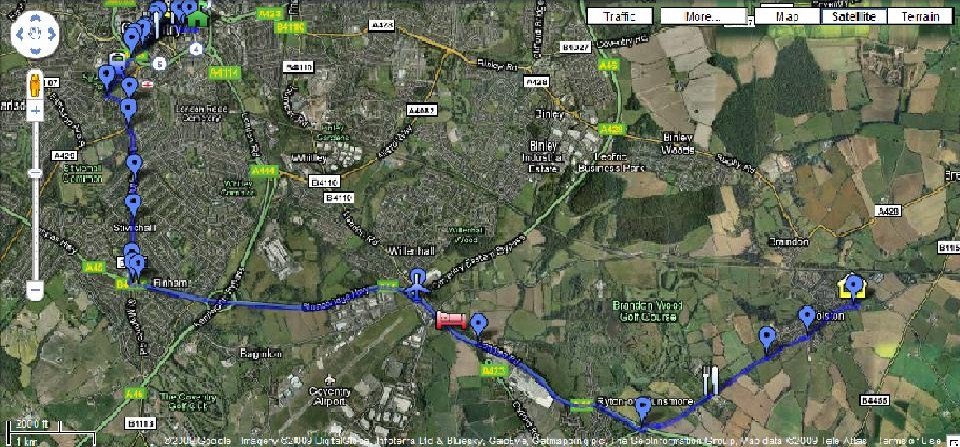
We were set our main task which was to create a interactive piece that is a journey from one place to another. I decided to expand my original idea of my Psychogeography and Dérive and make it from my house to university Ellen Terry Building including video’s, still’s, sounds and split screens to create a video piece but after shooting it, I wanted to make it more interesting and MORE interactive as it wasn’t very at all apart from the audience having to interactive with the screen to try and watch it because I had made it interesting by making it experimental, by muddling the route and having a 9 frame split screen. I then thought I really enjoyed Google Maps maybe I could use that so I did I turned my Google Maps into a interactive story which can be seen below and linked here.

So over all even though it has been a slightly different look at interactivity and not what I was expecting, all the things we had looked were still interactive and I have found out a hell of a lot of things can be classed as interactive. I have had fun learning along the way and I believe this module has given me a slightly different view on things and what the future may hold for technology and people.

I love Twitter :)

It brings people together 😀

This week has been awesome for many reasons one I went to see The Box on friday the 4th and it was amazing its directed by Richard Kelly who is my favourite director he made Donnie Darko which is my favourite film and also Southland Tales which I loved too whereas others didn’t, I did 🙂 and The Box is his new film… anyway I went to see it and loved it which isn’t a surprise so i came on to Twitter when i got home as you do and wrote: “@JRichardKelly the box was amazing!” and the next day I woke up to find this and it made my day its was awesome 😀

How cool is this I love twitter big famous directors talk to you 🙂 QUALITY! 😀

Also what made my week the NEW Dashboard Confessional CD Finally turned up and its amazing! and it came with an official signed CD Booklet which is AMAZING! as I love this band they are my favourite!

so its been a very good week 🙂

Maps Maps Maps

OpenStreetMap I see the attraction but what’s the point… like wikipedia (which I love, I think it’s really good and helpful in finding things out) OpenStreetMap is a free editable map of the whole world it allows you to view, edit and use geographical data in a collaborative way, using data from portable GPS devices and aerial photography to create maps of certain areas. Its good but there’s no need for it when you have Google Maps which is a million times better!  

I thought Map Tube was a fun way to look at some information using a map of great Britain and highlighting areas ones I found interesting were: ‘Assault using Knife or Sharp Object – 2006/07’ and ‘BBC Look East: Anti-social Behaviour’ but there’s loads to take a look at some not as interesting or as funny. 

I also took a look at ‘Layar’ and ‘Wickitude’ which are both very cool! Basically you download the app onto your phone (only work on the Iphone 3GS which is really crap) then when you open up your camera and point it at a landmark little pop-ups layered over the top of what would be the photo appear giving you more information about the place which is so cool! I really like this which ‘Layar’ showed on their website: 

“Storytelling: Beatles Tour 

Abbey Road in London has become famous for housing the studio where the Beatles recorded most of their albums, including their final and most successful one, “Abbey Road“. Now it is possible to see Ringo, Paul, John and George back on Abbey Road, simply by pointing your phone at the zebra crossing. After having taken some screenshots with your friend standing next to the Beatles in 3D, you can proceed to the next location on the Beatles discovery tour, which covers 42 locations. The next destination only appears after the previous location has been visited.” (Text and photo taken from Layar)

So ‘Wikitude and Layar’ are both really cool but I think it sucks that its limited to so few phone and that other phones can’t do this.

A is for… Amazing I mean… Awesome… NO I mean AVATAR!

Well the new interactive trailer is… you can download it to your computer. It’s an Adobe Air app (“Adobe Integrated Runtime (AIR) is a cross-platform runtime environment for building rich Internet applications using Adobe Flash, Adobe Flex, HTML, or Ajax, that can be deployed as a desktop application.” Taken from wikipedia) that features the Avatar trailer, with pop-up options one being ‘Hotspots’ which allows access to character profiles and making-of shorts which is really cool and gives you a bit more of an insight into the film.

It also has a ‘Feeds’ pop-up which integrates the official Avatar Twitter, Flickr and YouTube feeds. So it can sit on your desktop and keep you automatically updated with all the latest photos, videos and Tweets.
Finally there is a purchase tickets pop-up with a few different links for you to get tickets to see the film.

This is an awesome new type of interactive trailer to go with a film that is meant to be the next huge turning point in cinema like the start of colour films who knows yet but im definitely going to see it and also this trailer maybe just the first step in a whole new line of trailers for films.

Start to get excited now 🙂

You can download it HERE to take a look and get interactive with the film trailer.

Roll on Dec 18th woop.

So I have finished my video…

I started off with a few different ideas for my Interactive video it was always going to be the journey from my house to university: Ellen Terry Building, but creating it in different ways for example: One idea I had was to create my journey from my house to university with the use of footage, photos and I was thinking of using Google SketchUp to create an animation of the last part of my journey from town to Ellen Terry Building, but… I couldn’t get round Google SketchUp it seemed like a really good piece of free software but I think I would need a lot more time to learn how to use it to create a whole space in it. So I moved on from that idea wanting to make it more interactive. Another idea I had was to have a split screen with the top screen being my journey to Ellen Terry using footage and photos and on the bottom screen my journey back which was to be all footage, a text description of my journey would also be scrowlling on the bottom screen over the returning home footage just to make it more interactive. I kept some of these ideas for my final video (split screen and the footage choice) but it isn’t really like this and I scrapped the text in the end as the finished video didn’t need it. I also had the idea of putting it all into a ‘Prezi’ Presentation this idea was more of a thought than an idea I didn’t really know what I could do with it I went on the ‘Prezi’ website and started to look into it and making one but I didn’t really know what I could put into it maybe upload some videos photos and text description if my journey i just thought it was a good way to make it interactive but I couldn’t work out how to sort it out or what to put into it or how to start it so I scrapped that idea/thought and decided to do a video piece.

So I started to develop my final idea I knew I wanted to do a journey from my house to Ellen Terry Building and that I was going to film some parts and take some stills and interweave between the two in my video I also developed the split screen idea after seeing the multi screen video ‘SOUR ‘日々の音色 (Hibi no neiro)’ thinking that it was really cool and that I wanted to do something like this. We also to a look at non-narrative and experimental films in class and watched a few videos, I thought even if I do my journey using photos and footage in split screen it won’t be very interesting, just be boring, so I thought I would take it further more than just one split screen how about 9…

And also how about not making it narrative make it more experimental… so I decided to not put the footage in order so it wasn’t just my basic journey but to have it all come in at the same time slightly staggered but so it wasn’t just following the journey, it showed the journey going and coming back at the same time then also half way through the journey and shot from inside the car all at the same time so making it more interactive because the viewer would need to interact with the video more than usual to try and understand what’s happening, this also making a simple journey a lot more interesting. For the start of the video I had came up with the idea to use the Google Map route I created earlier on by opening it up in Google Maps and starting the shot zoomed out from the world to have it zoom into my map route that I had exteneded since I made it I then recorded this using CamStudio to film what’s happening on the screen so I could edit this into my final Piece.

So I had my idea and started to film I used just a basic stills camera that also had the ability to record footage and sound so I did all of my filming, photo taking and sound recording with it, this made life easier and also still produced a good quality video… Most of the video footage was filmed in my car while I was driving so I had the help from ‘Lisa Stocker’ in filming and taking photos while I was driving us on my journey when I stopped driving I took over taking photos and filming. Once I had got all my footage I began to edit using Avid…( just to go off topic with a rant *)

*We took a look at Final Cut on Tuesday in class which is fair enough I like learning new software so if I ever need to edit using it, I can but why is there so much beef with Avid I personally like Avid and think it’s a great piece of editing software and believe if you put effort into learning how it works it’s really not that hard to get on with it but everyone else seems to think “ooo its too hard and confusing its crappy” blah blah blah NO your just lazy and can’t be arsed to use it properly and learn, once you have if you’re not lazy you can do so much with it, with reasonable ease, so fair enough using Final Cut did seem much simpler to use but when I see that, I instantly think it isn’t as good because it’s too easy to use which isn’t really the case just how I feel. But really isn’t final cut a glorified Windows Movie Maker? ooo have I crossed a line??? At least I feel quite professional using Avid so haters back off!

… I imported all my footage and began editing starting with my Google Maps footage then going into the start of my journey starting in the car then going into the first split screen then gradually adding more and more split screens it was actually not to difficult to do this well I started to do my split screens until someone got bored and wanted to have a go a then took over (Lisa) but it was ok she was just helping out I then carried on editing and sorted out the sound which was just natural sounds from my journey the types of things I would hear so music in my car then outside sounds, wind, people talking, traffic for example the video was then complete:

So the video was complete and it looked good I was happy with it I didn’t really have any problems with filming or editing and I thought it was a good way to show my journey in a less boring normal way but is it interactive enough? I didn’t really think so…

So what could I do. I thought and thought… Then I remembered my Google Map of my journey I had already extended it.

So I thought I could make it more interactive and make this my project, my piece, so from one of my before ideas i had wrote almost a story that I was going to have on my video but scrapped that idea it was the story of my journey so I decided to put the story into the map so when you click in some of the placemarkers you get a part of the story and a photograph or video sequence that I have taken from that area, and you can follow the story and my journey from my House to the Ellen Terry Building then at the end you get my final video I think it looks really good and I  put a lot of work into it and I am really happy with how its turned out take a look and get interactive yo…


Do we need a narrative?

NO!

Apparently we don’t… we took a look at some experimental films to get our creative juices flowing for our second video/piece to get us thinking about Evocation (imaginative re-creation – the ability to form mental images of things or events), Atmosphere, Place and Experimentation.

We took a look at ‘Detroit’s Beautiful, Horrible Decline’ this is a great piece in which they let the photos tell the story no need for anything else the photos do it perfectly and really capture the downfall of Detroit well, they show real atmosphere and place in them with no real narrative, the photos do it on their own. Two videos we watched were experimental videos ‘Stan Brakhage – I…Dreaming’ and a clip from ‘Derek Jarman – BLUE’. TBF (To be fair) I didn’t really like either of them or any of the videos we watched that day but they did influence me for my second video/piece when it came to Stan brakhage’s I… Dreaming I really liked how he had physically scratched words into his film, I think it’s a really good effect and I want to do it to my own video but I don’t film on physical film so I could just edit words in and maybe use a font so it looks scratched in but that’s something I will need to look into while editing. While watching Derek Jarman’s ‘Blue’ clip I liked the thought of at some point during my video the screen could go black but the sound remains on as I thought it really works even without image you still know what’s going on and you can still follow the narrative or what’s happening.

So my idea that came from watching these videos was that during my split screen journey to university the screen will suddenly go black (or maybe a colour instead of black still need to decide on that) with the sound/audio then editing in words to just pop up on the screen like there scratched in occasionally, then this will just stop and the normal video will commence but all of this is just ideas until I finish filming and start editing.

I also watched some of the ‘Super Mario’ game clip which I just thought was retro and cool 🙂 and also I had seen ‘La Jetee’ in college and thought it was really cool the idea of it is really smart we also watched ’12 Monkeys’ in college which is inspired on it and that’s really good too bit of a mind boggler but good 🙂

OMG PhotoSketch!

After reading the blog: Mashable and reading about ‘PhotoSketch’ it was almost unbelievable how good this piece of software is it allows you to draw a email and tag it with what each image is then it will search the internet the best images it can find to match yours and somehow amazingly edit them together to make an awesome photo it’s just insane how good it is I really want to give it a go but currently can’t download it or buy it as it was a free piece of software and because it’s so freaking good there was far too much demand for it that the download has now crash to make it better so it can meet the demands of people wanting it, it really is quite awesome if you take a look at the video it shows you how amazing the software is:

It’s perfect for people that aren’t good at using Photoshop or are lazy it’s just a really impressive bit of software which will be huge when it becomes available… which I hope is soon because this is like nothing you have ever seen it looks too good to be true.

Mashup and the multi-screens video.

I took a look at the blogs on ‘Mashup using Streetview’ and ‘Video Walls’.
I thought that what the band ‘Editors’ had done using Google Maps was really cool and a way of advertising music like no band had tried before it was interesting to go searching round the different streets of London hearing new music from the band they had edited/hacked Google Maps so when you got to some parts of London you would see the band or friends of the band in certain places doing certain things that where relevant to the song you where hearing at the time this was cool and very clear how they have been able to do this to Google Maps. In my second video/piece I am making, I have made my route on Google Maps and have used a really handy bit of free software called CamStudio which allows you to record what’s happening on your monitor screen like a video Print Screen which is really cool, so I took my Google Map and viewed it in ‘Google Earth’ and recorded the screen as it zooms from a view of the entire earth to my street map which I thought looked good.

I then watched the ‘SOUR ‘日々の音色 (Hibi no neiro)’ video on the ‘Video Walls’ blog. I thought this was really well made and a awesome use of multi/split screening for my second video/piece I am going to be using split screens of all different parts of my journey to University mainly from inside the car during one part of the journey but I will have some split screens not as many as this video but a few its still a work in progress.

MC Lars: The mans a genius.

After seeing MC Lars last night I had completely forgot before hand how much his music has to do with interactivity and I thought it was very much relevant to my blog so just wanted to share two of his song with you, so you can see…

MC Lars – Download This Song (lyrics)
 

MC Lars – iGeneration (lyrics)

Layers and my Idea

During this week’s class we took a look at narrative and layering we watched this video JJ Feild – The Tulse Luper Suitcases I: The Moab Story (Clip 4) which i found very interesting in how they had layered everything we also watched Powers Of 10 which went straight over my head (maths) but i thought the concept and how it looked was really good. These videos showed us what we could do for our second exercise/task add a depth to your work and make it more original and interesting rather than ‘this is my story, my route’, you can add photo’s video footage, text, split screen, animation just to make it different and less boring  by using layers, we also got shown some interesting free software to look at.

To go on and develop my idea from my original psychogeography walk video… My idea is to extend my original journey and make it from my house to where I drop my car off in Earlsdon then walk to HMV and (maybe) then walk to the Ellen Terry Building of university to finish the Journey. I plan on starting the video with footage from Google Earth starting zoomed out really far then zooming in to show Google Maps of the route I take on my journey. It will then go into a split screen with the top layer being my journey beginning in the car with video footage of the inside of the car as it pans out to show driving down the road, it will then go onto photos for the rest of the car journey until we get to Earlsdon where I will then use my old photos to follow the journey to HMV which is where it will go back to video footage for the rest of the journey to the Ellen Terry Building. In the other half of the split screen I will have a shot out of my windscreen for a night time journey from the Ellen Terry Building all the way back to my house with text over the top about my journey to university in detail.

So I plan on having a few different layers so there will be lots going on hopefully to keep the viewer interested and make for a good video. I may make alterations to this idea as I start to film and take photos though as it has already changed once, I was originally going to have an animated section created in Google Sketchup but after downloading and having a good fiddle, I believe it would be too complicated to recreate what I wanted to do so I have scrapped that idea but the software itself was fun to have ago on.

During class while talking about layers I remembered a film I watched during my first year of college called ‘Timecode’ which I didn’t think much of then but remembering back to it now I can see how it was a brave step forward for a feature film, filming in real time with four cameras and no edits, then the screen is split into 4 each showing different shots as one section of the screen becomes the main sound then that will get quieter and one of the others will become louder for you to hear and listen too but its quite hard to keep in control of the whole thing with four screens its gets a bit confusing.

Here’s the trailer…